Điều khiển AutoCAD, Civil 3D & Revit bằng trợ lý AI Drive AutoCAD, Civil 3D & Revit with your AI assistant
Kết nối trợ lý AI với phần mềm Autodesk đang mở để tạo, chỉnh sửa và xử lý bản vẽ bằng yêu cầu tự nhiên. Giảm thao tác lặp lại, tập trung vào công việc thiết kế. Connect your AI assistant to a live Autodesk session to create, edit and process drawings using natural-language requests. Spend less time on repetitive tasks and more time designing.
Dành ít thời gian hơn cho thao tác lặp lạiSpend less time on repetitive CAD tasks
Khối lượng bản vẽ lớn, thao tác lặp lại và công cụ rời rạc khiến đội kỹ thuật mất nhiều giờ cho việc đáng lẽ có thể tự động.High drawing volume, repetitive actions and scattered tools cost engineering teams hours that could be automated.
Thao tác lặp lại tốn giờRepetitive work burns hours
Cùng một chỉnh sửa trên hàng loạt bản vẽ — làm tay vừa chậm vừa dễ sai sót.The same edit across many drawings — doing it by hand is slow and error-prone.
Khoảng cách giữa AI và bản vẽConnect AI to your drawings
Khi chưa có kết nối phù hợp, bạn phải chuyển hướng dẫn của AI thành từng thao tác trong phần mềm.Without the right connection, you have to turn AI instructions into individual actions in your software.
Script rời rạc, nhiều rủi roScattered, risky scripts
Macro và script rải rác khó tái sử dụng, khó kiểm soát và tiềm ẩn rủi ro khi chạy tự do.Loose macros and scripts are hard to reuse, hard to control and risky to run unchecked.
Trải nghiệm trước khi chọn gói.Try it before choosing your plan.
Khám phá IntraCore MCP cho AutoCAD, Civil 3D và Revit trên máy của bạn. Đăng ký và xác minh email để nhận 7 ngày dùng thử miễn phí, tính từ lần kích hoạt đầu tiên trong Autodesk.Explore IntraCore MCP for AutoCAD, Civil 3D and Revit on your computer. Register and verify your email for a free seven-day trial, starting with your first activation in Autodesk.
- 7 ngày dùng thử AutoCAD, Civil 3D và Revit.Seven-day trial for AutoCAD, Civil 3D and Revit.
- Gắn với một máy; mỗi máy và tài khoản dùng thử một lần.Bound to one computer; one trial per computer and account.
- Không cần thanh toán để đăng ký dùng thử.No payment required to request a trial.
Miễn phí dùng thửFree trial
Đăng ký dùng thử →Register for a trial → Đã có tài khoản? Đăng nhập để kiểm tra góiHave an account? Sign in to check your plan Tự động cấp sau xác minh email. Thời gian bắt đầu khi kích hoạt lần đầu trong Autodesk.Granted automatically after email verification. Starts with your first activation in Autodesk.Khám phá các gói IntraCore MCPExplore IntraCore MCP plans
Chọn phần mềm phù hợp. Kết hợp nhiều phần mềm để tiết kiệm hơn.Choose your software. Combine products for better value.
Giá mỗi tháng · mỗi licensePer month · per license
IntraCore MCP hoạt động như thế nàoIntraCore MCP in action
Theo dõi cách một yêu cầu được chuyển thành thao tác trên bản vẽ hoặc mô hình Autodesk.See how a request becomes an action on an Autodesk drawing or model.
Xem bản đầy đủ (1 phút 28 giây) →Watch the full walkthrough (1:28) →
Công cụ hỗ trợ công việc thiết kế hằng ngàyTools for your everyday design work
Tiếp nối công việc trong cùng phiênContinue work in the same session
Giữ dữ liệu script giữa các lần gọi để tiếp tục công việc mà không phải bắt đầu lại.Keep script data between calls so you can continue without starting over.
Thao tác trên bản vẽWork on your drawing
Gửi yêu cầu cho trợ lý AI để đọc dữ liệu, tạo hoặc chỉnh sửa đối tượng trong bản vẽ đang mở.Ask your AI assistant to read data, create or modify objects in the open drawing.
Xử lý hàng loạtBatch processing
Áp dụng cùng một script cho nhiều bản vẽ DWG, với chế độ chạy thử trước khi xử lý.Apply one script to multiple DWG files, with a test mode before processing.
Script ngay trong phần mềmScripts inside your software
Soạn và chạy script trong bảng SCRIPT/BATCH của Autodesk, kết hợp với trợ lý AI qua MCP.Author, propose and run scripts inside Autodesk, sharing the session with MCP.
Mở rộng theo nhu cầuExtend for your workflow
Bổ sung kiểu dữ liệu tùy chỉnh cho các quy trình chuyên biệt, với bước duyệt trước khi nạp.Add custom data types for specialized workflows, with review before loading.
Kết nối trợ lý AI bạn sử dụngConnect your AI assistant
Hỗ trợ Claude Code, Codex, Copilot và Claude Desktop qua marketplace hoặc cấu hình trực tiếp.Works with Claude Code, Codex, Copilot and Claude Desktop via marketplace or direct config.
Bắt đầu chỉ với ba bướcGet started in three steps
Từ lúc liên hệ đến khi điều khiển Autodesk bằng AI — nhanh gọn, có hướng dẫn.From first contact to driving Autodesk with AI — quick, with guidance along the way.
Đăng ký dùng thửRegister for a trial
Đăng ký và xác minh email để nhận 7 ngày dùng thử miễn phí.Register and verify your email to receive a free seven-day trial.
Cài đặt & kích hoạtInstall & activate
Cài bộ IntraCore MCP và đăng nhập tài khoản ngay trong Autodesk.Install IntraCore MCP and sign in right inside Autodesk.
Dùng AI điều khiển AutodeskLet AI drive Autodesk
Kết nối Claude, Codex hoặc Copilot và ra lệnh bằng ngôn ngữ tự nhiên.Connect Claude, Codex or Copilot and command in natural language.
Cài đặt, kết nối và bắt đầu sử dụngInstall, connect and get started
Làm theo 9 bước để cài IntraCore MCP, xác minh email, kết nối Autodesk với AI và kích hoạt gói sau thanh toán.Follow nine steps to install IntraCore MCP, verify your email, connect Autodesk to AI and activate your plan after payment. Guide available in Vietnamese.
Giao diện & luồng thao tácInterface & workflow
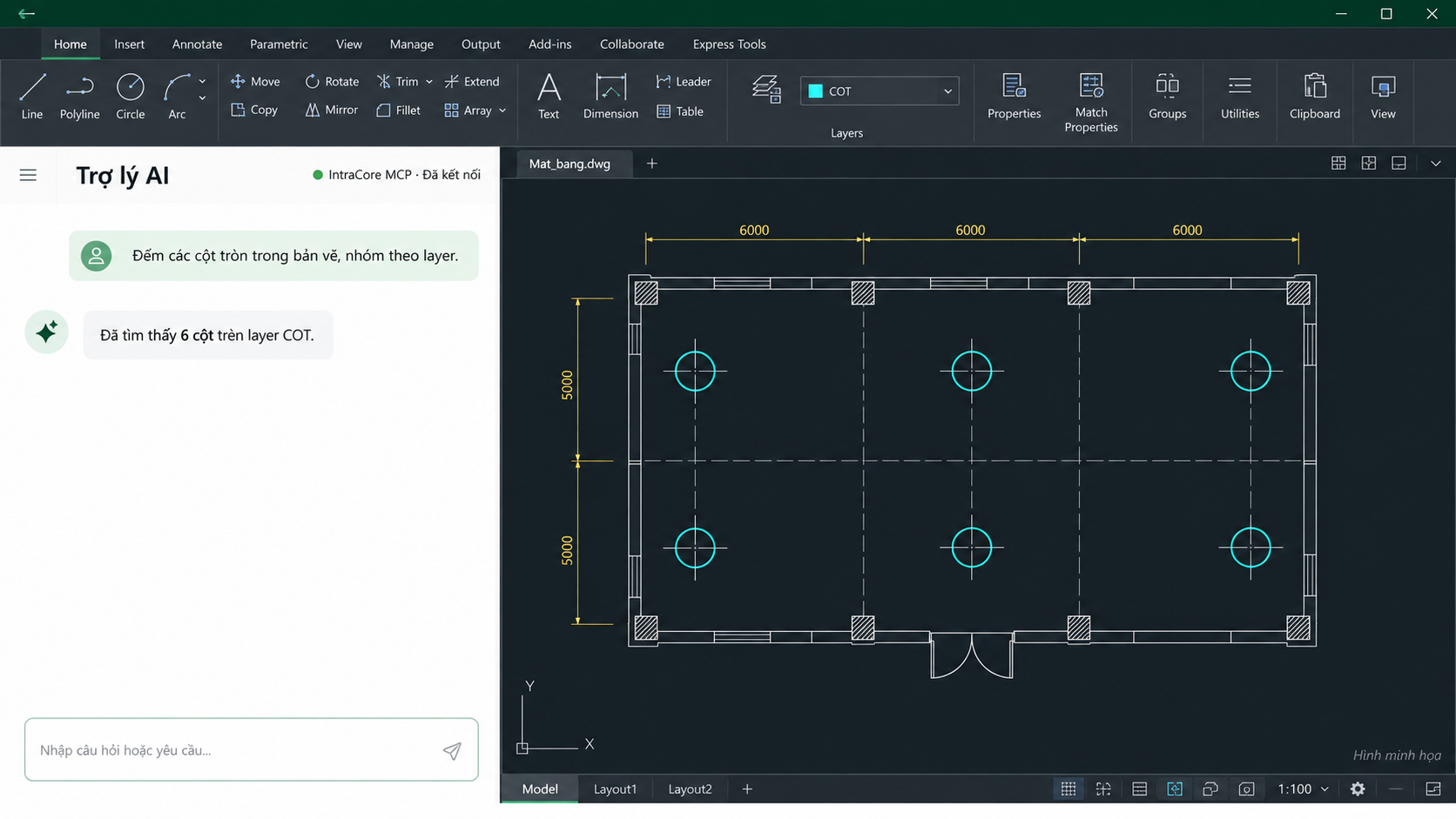
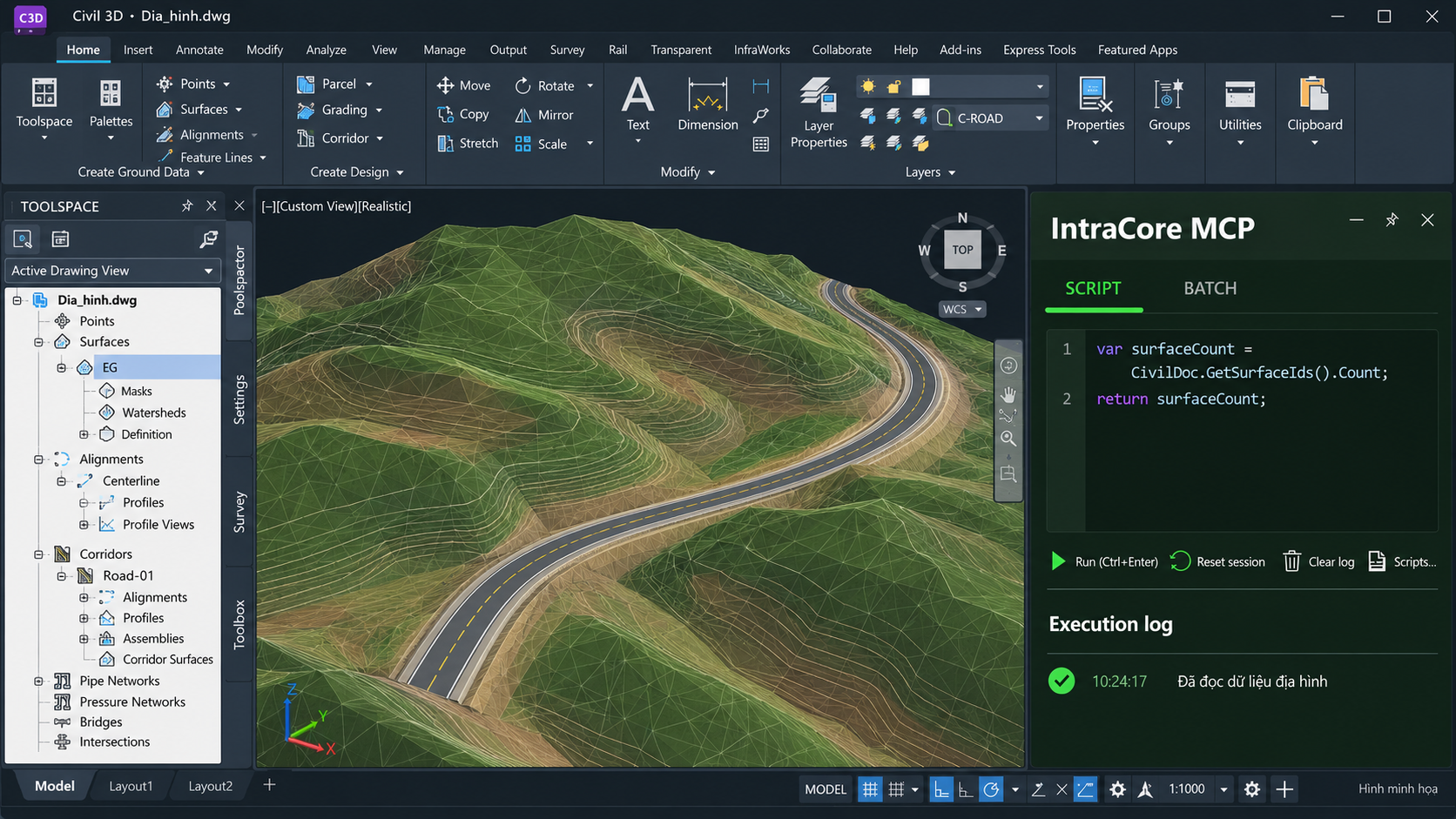
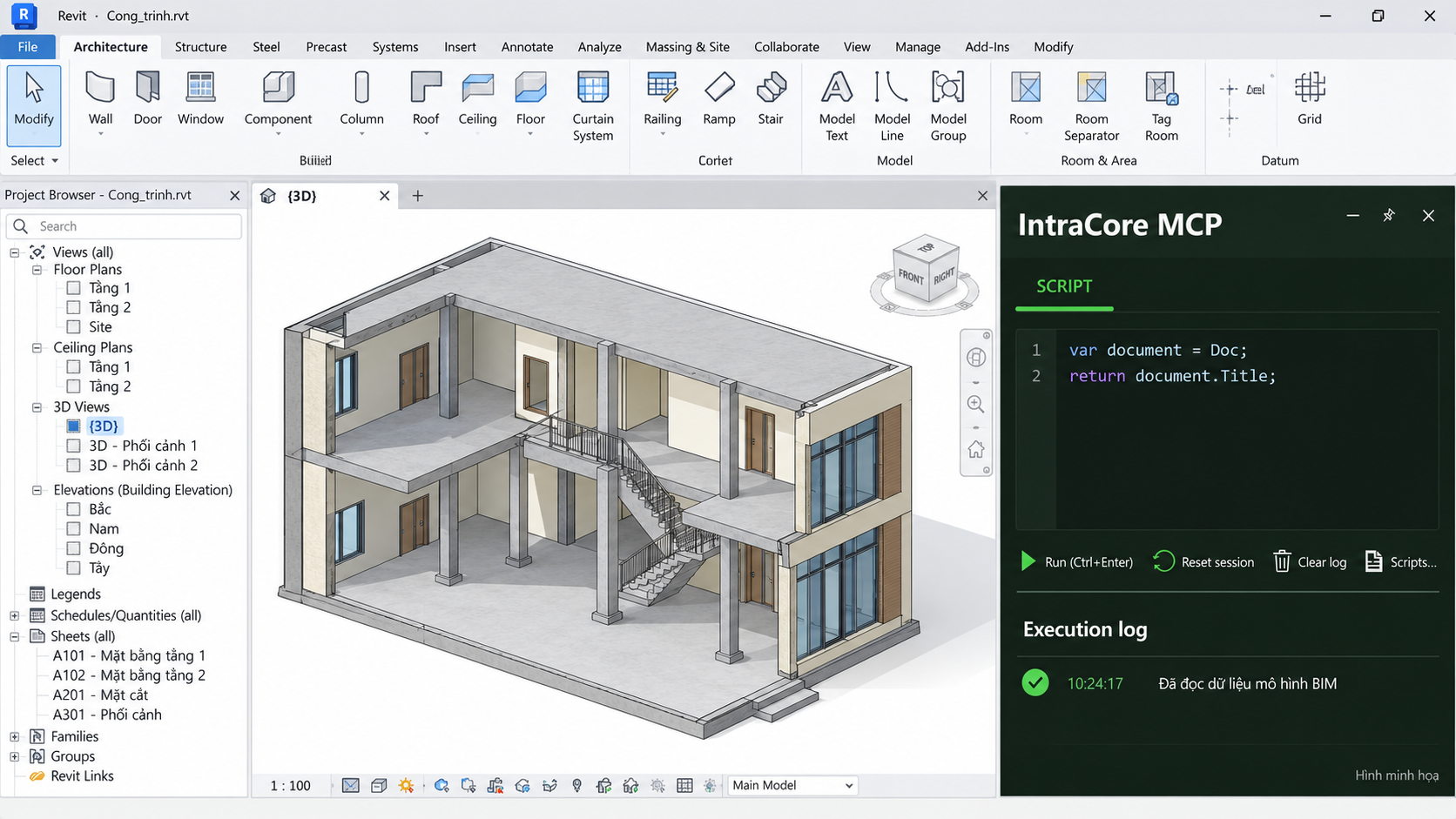
Khám phá IntraCore MCP trong AutoCAD, Civil 3D và Revit. Bộ ảnh minh họa được tạo bằng AI theo giao diện IntraCore MCP.Explore IntraCore MCP in AutoCAD, Civil 3D and Revit. AI-generated illustrations based on the IntraCore MCP interface.
Bản quyền an toàn, quản lý dễ dàngSafe licensing, easy management
Quản lý tài khoản, thiết bị và quyền sử dụng tại một nơi.Manage accounts, devices and entitlements in one place.
Những điều bạn có thể thắc mắcQuestions you might have
Kỹ sư, họa viên và đội nhóm làm việc nhiều trên AutoCAD, Civil 3D, Revit muốn tăng tốc công việc bằng AI.Engineers, drafters and teams working heavily in AutoCAD, Civil 3D and Revit who want AI to speed up their work.
Windows x64, .NET 8, phiên bản Autodesk tương thích và một trợ lý AI hỗ trợ MCP. Liên hệ để xác nhận phiên bản phần mềm của bạn trước khi cài đặt.Windows x64, .NET 8, a compatible Autodesk version and an MCP-enabled AI assistant. Contact us to confirm your software version before installation.
Gói theo tháng: AutoCAD 369.000 ₫; Civil 3D hoặc Revit 369.000 ₫. Combo hai sản phẩm 649.000 ₫; ba sản phẩm 899.000 ₫. Đăng nhập để chọn gói và tạo đơn chuyển khoản.Monthly plans: AutoCAD 369,000 VND; Civil 3D or Revit 369,000 VND. Two-product bundle 649,000 VND; all three 899,000 VND. Sign in to create a bank-transfer order.
Trợ lý AI gửi yêu cầu qua IntraCore MCP để thực hiện trong Autodesk đang mở. Hãy mô tả rõ đối tượng và phạm vi thao tác, lưu bản sao trước khi sửa dữ liệu quan trọng và kiểm tra kết quả sau khi thực hiện.Your AI assistant sends requests through IntraCore MCP to the open Autodesk application. Describe the target objects and scope clearly, save a copy before changing important data, and check the results afterwards.
Claude Code, Codex, GitHub Copilot và Claude Desktop qua giao thức MCP.Claude Code, Codex, GitHub Copilot and Claude Desktop over the MCP protocol.
Chọn Đăng ký dùng thử và xác minh email để được tự động cấp 7 ngày, tính từ lần kích hoạt đầu tiên trong Autodesk. Gói miễn phí gắn với một máy; mỗi máy và tài khoản chỉ dùng thử một lần. Chúng tôi sẽ hướng dẫn cài đặt và kích hoạt.Select Register for a trial and verify your email to receive seven days automatically, starting with your first activation in Autodesk. The free trial is bound to one computer, with one trial per computer and account. We will guide you through installation and activation.
Nhận bản dùng thử IntraCore MCPGet your IntraCore MCP trial
Để lại thông tin, chúng tôi sẽ liên hệ và cấp tài khoản dùng thử sớm nhất.Leave your details and we'll get back to you with a trial account shortly.